Five Pillars, My Search
for Meaningful Impact.

Nurturing personal and professional growth
with purpose in the next phase of my career.

00 // INTRODUCTION

What is all this about?

Starting out as a UI/UX designer can be overwhelming with the array of principles, tools, and techniques to grasp. To make things easier, let’s break down the 5 pillars of UI/UX design and provide a clear approach on how a newbie should start, along with essential elements to focus on.

I’ve worked fully on-site, hybrid, and fully remote (last 4+ years) and can see the value in both settings.

I’ve worked in different product such as Aviation, Healthcare and Automobile.

I’ve worked as an individual contributor and as a member of a team and as a combination of the two.


Suffice it to say, that I’ve been able to figure out what environments are mutually beneficial for myself and the company that employs me.

I was recently challenged to document 5 five pillars that culminate my ideals when looking for the next stage of my career.

01 // Journey

How My Journey Through Different Companies Shaped My Approach

Starting out as a UI/UX designer can feel overwhelming with all the principles, tools, and techniques to master. Over the years, I’ve had the privilege of working with diverse teams in various industries, each company adding a new layer to my understanding of design.

In today’s fast-paced digital world, design isn’t just about making things look pretty; it’s about solving problems, creating meaningful experiences, and making sure users can easily interact with products.

Whether it’s an app, a website, or a complex system, the user interface (UI) and user experience (UX) are at the heart of how users engage with technology.

In the real world, good design can make or break a product. Imagine trying to use an app that is difficult to navigate, or a website that takes forever to load — users will quickly abandon it.

02// How big tech work

How Big Tech Companies
Work in Design

Big tech companies like Google, Apple, and Microsoft have entire design teams dedicated to every aspect of product development. These companies understand that great design is a business advantage, and they invest heavily in building design systems, collaborating between designers, engineers, and product managers to create polished, seamless experiences.

- Design Systems: Companies like Google have well-established design systems (e.g., Material Design) that allow their teams to maintain consistency across all platforms, from mobile apps to websites and beyond.

-Collaboration: Big tech companies use an iterative process that involves constant feedback from real users, A/B testing, and usability testing, ensuring that designs are always evolving to meet user needs.

-Scale: These companies often work on products that need to scale across millions of users. This means that UI/UX design must be highly scalable and adaptable to diverse user needs and preferences.

03// Key elemets of design

The 5S of UX design

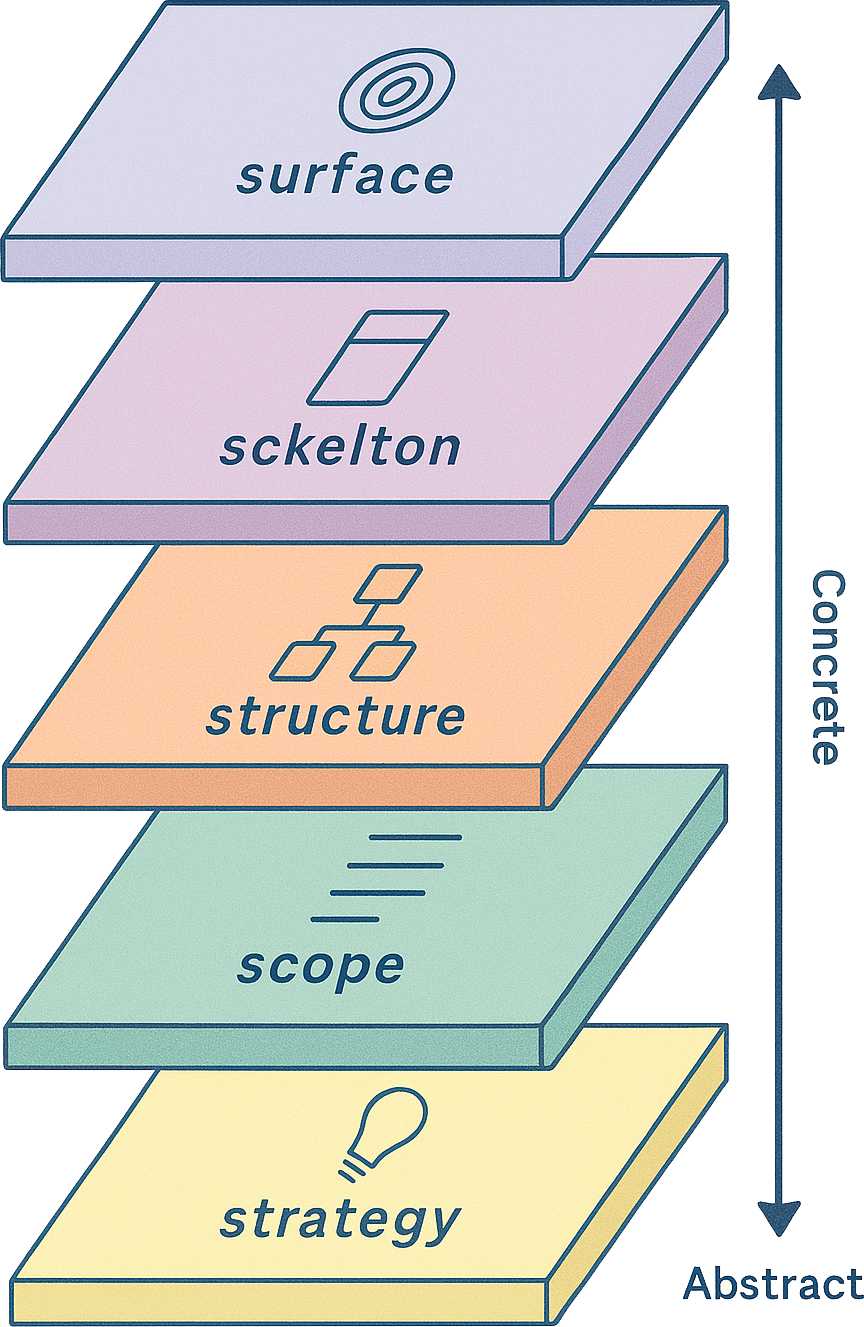
As can be seen in the diagram below, the 5 elements of user experience exist on 5 separate planes, each one stacked on top of the previous one to create an outline of the process UX teams can follow for every new project they design. From bottom to top those planes are strategy, scope, structure, skeleton and surface. Each one builds on the next as the project goes from abstract to increasingly more concrete until arriving at the finished product. In addition, each plane requires meeting different goals or completing different tasks.

Strategy

The bottom plane of the model is Strategy. As the most abstract and least constrained part of the project, this is where decisions should be made about what objectives the product should be designed to meet.These objectives should include the goals that both the clients and stakeholders behind the product want to meet and the goals of the users, who will eventually look to the product to solve specific problems for them.

For example, let’s say we’ve been hired to build an app that helps people find charging stations for electric cars. On the one hand, we must be sure to meet the product objectives, which in this case would be goals such as, “Informing electric car owners of the nearest place to charge their cars”.

On the other hand, we need to meet user needs if we want users to come to our app for information. That means we need to understand what goals users would have when using the app, which we can discover through user research.
In this case, we might want to learn if users would want our product to provide directions to the nearest charging station, information about how many chargers are available there and how much it costs to charge a car at each listed charging station.

Scope

After deciding on the strategy, the scope of the product can be determined and laid out in detail. It’s here that all a product’s features are decided upon, including the information that users can find and the functionality that users can interact with.

On this plane, the UX team will create a set of functional specifications that identifies and describes every single feature of the product and a list of content requirements that identifies every single piece of content that will be included.

For instance, in our car charger finding app, on the functional specifications side we might want to include a feature to save previously discovered charging stations in our functional specifications. Meanwhile, in our content requirements we might list information like images of each charging station, maps of their locations, and details about the voltage of each available charger.

Structure

Once the scope of the product has been outlined, it’s time to start working on the structure. This is where each element of navigation will be decided, including where in the product each page can be found and where users can go after arriving at a given page.

This involves defining the interaction design and information architecture of the product.

On the interaction design side, we need to decide how users will interact with the site and how the system will respond, including what will happen if errors are made. This can be conveyed through conceptual models that explain each part of the user interface – usually in a flow chart format – that defines what users can do and how the product will react to each potential choice the user makes.

For example, to convey the structure of our electric car charger finder app, we might create a site map that shows the hierarchy of the product. This could include a home page where users can enter a location to find car charging stations. This could then lead to a list of stations each with a link that takes users to pages for individual stations.

Skeleton

After deciding how the product will be structured, its skeleton can be designed. This entails deciding where the navigation and functional elements from the previous plane will go on each product page.

It’s here that UX designers will make decisions about the product’s information design, creating wireframes and prototypes that arrange each part of the product, including the buttons, links, images and text. These are laid out in a way that ensures that users can quickly move through each page to find the information they need, while also understanding which elements of each page are interactive and which are not.

For instance, in our app, if we want to explain what users will see when they navigate to a page that describes a specific electric car charging station, we would create a wireframe that provides a blueprint of where each component of the page would go.

Perhaps we have a header with the app logo and navigation back to the complete list of stations. This will be followed by an image of the charging station, followed by a link to a map of the location followed by text providing practical information about the station.

This will help visualise each piece of functionality and content that will appear on the page and its placement.

Surface

The wireframes and prototypes created on the skeleton plane will be used on the surface plane – the top and most concrete plane – to create the final pages for the product. At this stage, we’re concerned with the users’ sensory experience.

This includes how the colours and textures employed in the visual design help them understand how to navigate through and interact with the site, and how the presentation of content draws their eye to key information.

For our electric car charging app, this could mean creating a consistent colour palette and layout, where the logo appears at the top of the page, the most important information appears in a wide column in the middle of the page, and less important information is relegated to each side of the page.

This layout anchors users with its consistent visual style while enabling them to easily find the information they’re seeking.

04// Summary

What you can learn

Tim Brown, the Executive Chair of the design firm IDEO defined design thinking as “a human-centered approach to innovation that draws from the designer’s toolkit to integrate the needs of people, the possibilities of technology, and the requirements for business success”.

Like the 5 elements of UX design, design thinking is an approach to solving design problems that starts with working to understand the problem and ends with a final product. The intent of design thinking is to enable people to be as creative as possible while keeping the people a product is designed for at the centre of every decision, even as business requirements and the limitations and possibilities of technology are also considered.

In many ways, design thinking dovetails nicely with the 5 elements and both approaches share the same basic goals and perspectives. As a result, implementing the 5 elements is one way to practice design thinking, as long as the designers involved maintain an open-minded, user-centric approach to the design process, something all UX designers should strive for in every project.

Rotate your device or view case study on desktop